Showing posts with label Computer. Show all posts

Monday, April 04, 2011

Python in Action!!

So.. rather than indulging myself with studying the basic, I decided to jump into action. Oh yeah, if you don't understand what I mean, I'm talking about my progress in learning Python.

Anyway, I didn't have much time as I wanted it, so I just ported the algorithm I found here (a great blog post by Mr. Alfred Thompson) into Python and transformed it into something like this:


I don't want to post my code for this now because it is messy. If I have time to make it more beautiful, certainly I will post it here. But for now, let's be satisfied with the picture.

Unto the next level!!

Friday, September 28, 2007

The Web Browser War

The massive growth and penetration of internet world makes "web browser" a common term in daily life. Internet user must know web browser brands such as Internet Explorer, Mozilla Firefox, Opera, Konqueror, Safari, etc. Microsoft used to have the biggest market share and dominate the web browser world with Internet Explorer. But that is a story from some years ago. Right now, Internet Explorer "fame" is challenged by other browsers such as Firefox and Opera (click this for more information). I, as one of the internet user, am also experiencing this issue, which is so funny that I mentioned in the previous post.

The story is as follow. I entered a photo contest held by Microsoft (see this post). The submission of the photos had to follow some guidelines such as maximum file size, file format, etc. So I carefully followed the guidelines, double checked everything, began submitting the photos, and it was approximately 40-50 minutes left till the submission deadline. Unfortunately the submission always failed. So I with a friend of mine tried to spot mistakes in my submission form. It was stated in the rule that every contestant must have a MSN account to be an eligible contestant. But this rule never asked even once in the submission form. So I desperately changed my e-mail contact with my Hotmail e-mail address (I created this Hotmail e-mail address just for this contest). But this effort was failed also.

Then, I checked again the submission guidelines and tried again to submit. But every time I tried to submit, it was always failed. I began to give up, because it was 30 minutes late from the deadline. I was also surprised that the submission form was not closed even if it had past deadline. I thought Microsoft held this contest half-heartedly, even now I still do so. But at that time suddenly I realized that I was using Firefox browser. Maybe I had to use the Internet Explorer, I thought that time. Have nothing to lose; I tried the submission once again with Internet Explorer. And it was a success.


Click Image to view the original size. The left browser is Mozilla Firefox and the right one is Internet Explorer.

I just couldn't believe this could be happened. I wasted almost one hour just because this silly problem. But it is just my guess. To be sure about this matter I have to asked Microsoft or take a peek at the submission system. Anyway I have a good hunch that it was just a really bad joke from Microsoft.

Side News:
  1. My friend mentioned above is Effendy (a.k.a. Pendy). I forgot add him to my credit list in the previous post. It has been corrected by now.
  2. Not to be surprised enough, I was surprised again by the fact that the submission form wasn't closed even around 12 hours after the deadline.

Wednesday, April 04, 2007

Personalized Searh Engine

Okay.. now it's computer time. First, for anyone who doesn't know about search engine, please follow this link. This semester I attend a lecture about "Special Topic on Search Engine Technologies". And right now, I just have done the mid term take home examination and get a lot of information about personalized search engine. So, what is this term mean?? I can't get the definition from the internet. But for me, a personalized search engine is a search engine that provides different benefit for every different people that using it. Main characteristic in personalized search engine is to access the personalized feature, we have to logon to the system first.

For everyone that have a Google account and usually use Google search for everything, you can activate this feature with accessing http://www.google.com/searchhistory. I activated this feature on April 30th, 2007. Google provides a search history to log your search query and every link you click from the search result. You can choose to pause the search history from logging your searching activity too. Then, from this search history, Google can generate your trend at searching with Google and offer you with interesting items that maybe you interested in, even if you haven't knew about it. Every link in search history can be saved to Google Bookmark too. The last one from search history page is searching feature in your own search history.

Other than search history, Google provide a personalized home too. I think a lof of people have tried about this. And the effect that I haven't felt yet that Google search result will be differ when you log on to Google or not. I have read about that in this article.

There are still a lot of personalized search engine in the internet, such as:
  1. MyWeb Yahoo!
  2. Eurekster
  3. iBoogie
  4. decipho
  5. Ask
  6. Rollyo

Ok, have a thing to do now. If you have tried a little about personalized search engine, feel free to put some comment on this post. Ciaoo!!

Tuesday, August 29, 2006

Koneksi internet super cepat

Wah senangnya hari ini walaupun telat bangun dan ga masuk kuliah Analisis Perancangan Berbasis Objek (APBO) hari ini. Pertama, gue berhasil ngerjain beberapa temen gue dengan sangat berhasil. Kedua, tiba-tiba koneksi internetnya jadi super cepat.

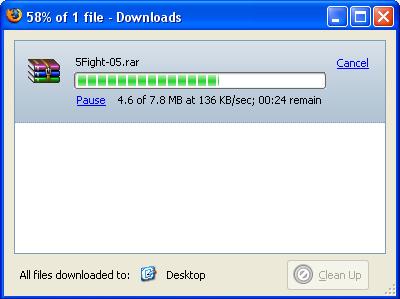
Kemaren sebenernya sempet kesel juga karena ga bisa download file-file ukuran besar (baca: file-file berukuran di atas 5 MB). Memang ada polisi penggunaan internet di kampus bahwa dalam rentang waktu pukul 09.00 sampai 17.00 ngga bisa download file-file berukuran besar. Tapi kemaren itu gue mau download sekitar jam 19.30 dan tetep ga bisa. Tapi ternyata hari ini, setelah tahu temen gue ada yang bisa download file sekitar 130 MB, gue nyoba lagi deh nge-download file-file yang gue mau. Sebenernya file-file apa sih yang gue mau itu?? Jawabannya adalah file-file mp3 dari album terbaru Five for Fighting, yaitu Two Light. Sekitar pukul 16.00 gue coba download lagi deh, dan hasilnya 70 MB berhasil disedot kurang dari 8 menit. Coba perhatikan gambar di bawah ini kalo ngga percaya.


Gue bahkan sampe ngedapetin kecepatan 550 KB/sec walaupun cuma sebentar. Berarti ini rekor terbaru dalam catatan download gue di kampus (rekor sebelumnya cuma sampe 250 KB/sec dan pake download manager). Kecepatan download ini stabil di sekitar angka 100-200 KB/sec. Sayangnya koneksi super cepat ini cuma bertahan sebentar banget. Sekitar pukul 17.00 kecepatannya menurun drastis ke kisaran 1-6 KB/sec. Ngga terlalu masalah sih, soalnya gue udah dapet semua file yang gue mau.

Koneksi internet di kampus pada dasarnya memang cepat. Tapi karena harus dibagi ke ribuan mahasiswa dan dosen, setiap orang bakal ngerasain kecepatan akses internet yang standar, sekitar 5-6 KB/sec. Walaupun begitu kalau traffic jaringannya tinnggi, kecepatan akses ini bisa turun lagi bahkan sampai 1 byte/sec.

Semoga aja gue bisa sering-sering ngerasain kecepatan seperti ini deh. Saatnya menikmati hasil download gue deh.

Wednesday, August 23, 2006

Sedikit Ulasan Teknis

Sebenernya sekitar tiga minggu yang lalu gue melakukan kesalahan yang cukup bodoh dan bisa dibilang ceroboh. Permasalahan yang gue hadapi itu adalah permission beberapa file dan folder di home folder gue (di kampus) ternyata mengizinkan group dan everyone untuk read dan write. Wah sempet kaget juga gue, padahal gue selalu ngecek permission file dan folder. Tapi karena banyak banget file dan folder yang gue rubah, timbul deh pikiran males gue.

"Wah kalo rubah satu-satu kelamaan nih. Mending gue ubah aja semua permission file dan folder jadi rwx (baca: read, write, execute) buat gue aja. Terus nanti folder public_html (tempat homepage) dan semua file di dalamnya tinggal gue kasih permission rwxr-xr-x (baca: read, write, execute untuk owner; read, execute untuk group; dan read, execute untuk everyone)."

Langung dah gue ketik serangkaian perintah di bawah ini dari home folder gue:
> chmod -R 700 *
> chmod 755 public_html
> cd public_html
> chmod -R 755 *

Celakanya... setelah gue cek lewat internet, ternyata homepage-nya ga bisa dibuka. Ngga terlalu masalah sih, tapi tetep aja ngeselin. Soalnya homepage ini cukup penting juga buat share file di kampus. Setelah diutak-atik lagi, gue berkesimpulan bahwa ada satu atau lebih file konfigurasi yang harus gue kasih permission read dan execute buat group dan everyone. Wah sekarang gue pusing deh. Males banget kalo harus dicek satu per satu, terus hasil googling pun ternyata tak banyak membantu.

Kemudian setelah tanya ke beberapa temen, katanya mungkin file .htaccess yang harus gue rubah lagi permission-nya. Tapi setelah gue cari ternyata file itu ga ada di home folder gue maupun temen-temen gue. Wah makin pusing lagi deh. Tapi akhirnya gue berjuang dengan ngecek satu per satu file dan folder.

Mendekati akhir perjuangan, gue baru sadar ternyata permission home folder gue sendiri adalah rwx------. Iseng-iseng gue coba ubah permission-nya jadi rwx--x--x. Wah ternyata si homepage-nya bisa diakses lagi lewat internet. Ternyata ini masalah utamanya dan akhirnya homepage gue kembali online.

Moral dari cerita ini adalah:
"Kalau kita berbuat sesuatu yang kita tidak tahu akibatnya, kita harus berani menghadapi resikonya"
"Kemalasan membawa petaka"

Walaupun kemalasan membawa petaka, tapi gue jadi dapet pengetahuan lebih nih, ha..ha..ha.....